The company's basic data can be updated with the company's admin user rights. With the exception of the Business id, the admin can edit all company information.
- Login to the Visma Sign -service
- Select "Settings" from the left sidebar
- Select "Edit" on the Company's basic data tab, after which the fields for updating the data will appear.
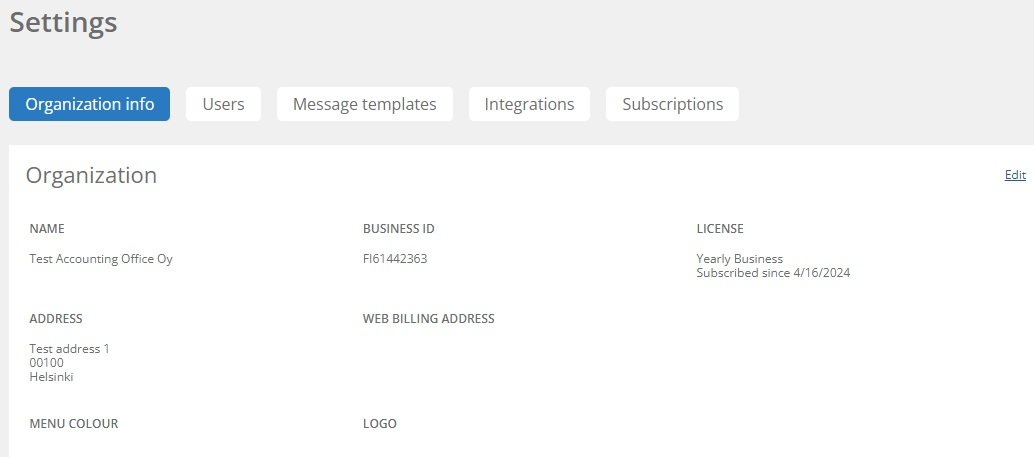
- Update the necessary information in the correct sections. Please note that if you add a web billing address, you must also add information about the web billing operator. The information must also always include the company's post address, even if the invoices are sent to a web billing or email invoicing address. We primarily prefer electronic transmission channels.
- Remember to save.
Note! Invoices cannot be directly viewed from the Visma Sign -service. The invoices we send can be found where they are directed according to your company's billing information.
This article has been translated using an AI-based translation tool. The contents or wording of these instructions may differ from those in other instructions or in the software.
Keywords: invoicing address, web billing address, web billing address, invoicing address changed, invoicing address updated, change of invoicing address , I need the latest invoice
Did you find it helpful? Yes No
Send feedbackSorry we couldn't be helpful. Help us improve this article with your feedback.
